
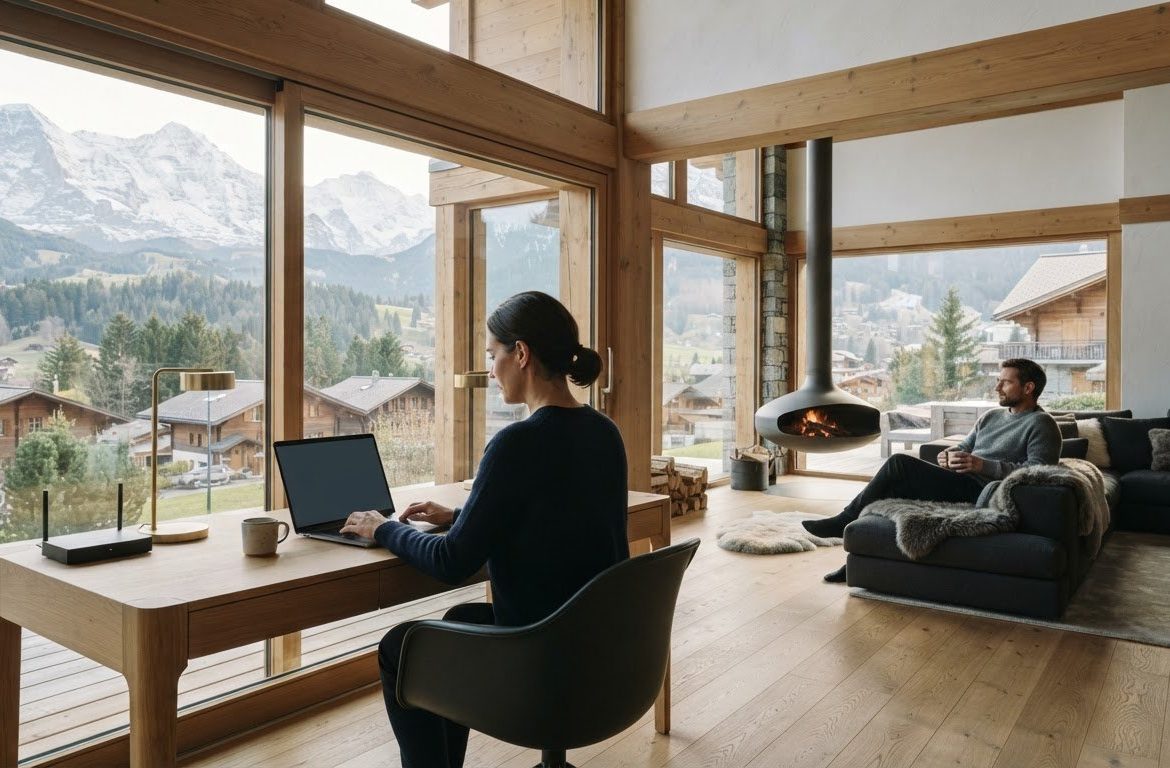
Finding a Vacation Rental with a Home Office: 2026 Guide
A desk in a rental photo tells you little about whether you can work there comfortably. Finding a vacation rental with a home office takes more than spotting a table and seeing “Wi-Fi” in the listing. You need to know whether the connection suits your calls and file transfers, whether the workspace is comfortable for your workday, and whether you can leave work behind when the day is done.
Work should fit into your stay without taking over the restorative feel of a holiday. This guide shows you how to assess the workspace, connectivity, comfort, and booking details before you reserve. You’ll learn what to confirm with the host, how to interpret listing photos and descriptions, and what to prepare if an essential detail can’t be verified. A few checks before booking can help you choose a stay that supports focused work while leaving room to enjoy your time away.
Key Takeaways
- Start with the tasks your workday requires, then use them to define what “work-ready” means for your stay.
- When finding a vacation rental with a home office, separate details confirmed by the listing or host from features that only appear in photos.
- Compare dedicated and shared work areas based on your need for privacy, focus, and comfortable downtime.
- Ask the host to confirm work-critical details in writing before finalizing your booking.
- Use a simple plan to shortlist, verify, and prepare, balancing workspace needs with holiday priorities.
Finding a Vacation Rental with a Home Office: Define What Work-Ready Means
A stay that combines focused work with restorative time away sounds appealing, until a call begins beside a busy living area or a laptop session stretches on an uncomfortable chair. The answer isn’t simply to look for a desk in a listing photo. Finding a vacation rental with a home office means checking whether the actual setup suits the work you plan to do and the way you want to spend your time off.
A home-office amenity is a workspace feature; a work-ready stay is a rental whose confirmed setup supports your tasks and routine. A visible desk is a useful clue, but it doesn’t confirm privacy, suitable seating, room for your equipment, or a setting where you can concentrate. Digital nomads may build travel around remote work, while other guests only need a convenient place to check messages. Their requirements can differ considerably.
For a helpful perspective on using a vacation home as a place to work, watch this short video:
What does a home office in a vacation rental need?
Start with the basics you rely on at home: a stable work surface, comfortable seating, and enough room for your usual equipment. Then consider the workspace’s location. A separate room may offer more privacy, while a desk in a living area could work if you’re travelling with others who can respect your work hours. Neither arrangement is automatically better. It depends on your tasks and household routine.
Listing photos and descriptions can help you assess what’s visible, but they may not answer every practical question. Confirm that the pictured workspace is available for guest use, ask whether it serves another purpose, and check that its layout suits the way you work. Treat unconfirmed details as questions, not promises.
How much work will the trip involve?
Checking a few emails between outings calls for less than a week of scheduled calls and full workdays. Think through your expected schedule: how many hours you’ll work at the rental, when you’ll need quiet, and whether you’ll join video calls or use equipment beyond a laptop. A shared table might suit occasional tasks but prove distracting during a long session.
Match the workspace to the most demanding workday you expect, not an idealized version of the trip. This helps you set priorities, ask focused questions, and preserve time for a genuinely restorative break.
Check the Workspace, Wi-Fi, and Privacy Before You Book
A polished listing can still leave important workday questions unanswered. Separate what the description explicitly confirms from what a photograph merely suggests. A desk in a corner, for example, doesn’t confirm that the space is private, that power is nearby, or that the connection suits your calls. Ask clear questions before you commit.
Confirm work-critical amenities directly with the host; a listing photo or general Wi-Fi mention isn’t proof that the setup will meet your needs. Travel-focused advice on how to thrive in a remote world also highlights the value of planning for the practicalities of working away from home.
What should you ask about vacation-rental Wi-Fi?
Describe your actual tasks rather than asking only whether Wi-Fi is available. A few emails may need less than a day of video meetings, regular use of cloud tools, or uploading large files. Ask how internet access is provided, whether it’s available throughout the property, and how guests connect. If the host can share relevant connection details, weigh them against your work needs, but don’t treat them as a guarantee of performance.
There’s no single connection threshold that promises a smooth experience in every property. Performance can depend on your tasks and where you work in the rental. Ask whether the connection has been checked in the area you expect to use, and clarify what the host can reliably confirm.
How can you assess comfort, quiet, and privacy?
Review photos for more than the presence of a desk. Look for a clear view of the work area, seating, lighting, nearby outlets, and room layout. If these details aren’t shown, ask about them. Confirm whether the workspace is in a separate room, a shared area, or a living space used for other purposes.
Noise and interruptions matter, too. Ask whether anyone else will share the space and whether household routines or nearby activity could affect scheduled calls. The Worldpackers guide offers helpful context, but only the host can confirm conditions at the specific rental.
- Workspace: Is the surface stable, and is the seating suitable for your planned sessions?
- Access: How do you connect, and is the internet available where you intend to work?
- Privacy: Is the space separate, shared, or part of a living area?
- Comfort: What can be confirmed about lighting, power access, and likely interruptions?
Keep the host’s written answers with your booking details so you can refer back to what was confirmed. As you compare options, you can also explore GuestLee’s Swiss rental offering, then verify workspace and connectivity details for the specific property you’re considering.
Compare Vacation Rentals by Workday Fit and Holiday Comfort
A useful comparison considers the whole stay, not just the workspace. As you continue finding a vacation rental with a home office, separate non-negotiables from features that would simply be welcome. A private room may matter if you have confidential calls; it may be less important if you only plan to answer a few messages. Attractive design can enrich a holiday, but it can’t substitute for a work setup that meets your needs.
| Work needs | Evidence in listing | Host confirmation | Leisure value |
|---|---|---|---|
| Quiet and privacy for scheduled calls | A workspace appears in a separate room or is shown apart from shared areas | Ask whether the room is private and what household routines could affect calls | A defined work area may help work feel separate from downtime |
| Occasional email or short laptop sessions | A stable surface and seating are visible or described | Confirm the area is available for guest use and suits your planned session | A shared-space setup may keep the stay feeling open and relaxed |
| Longer sessions and regular equipment use | Photos show the work area and enough of its layout to assess | Ask about practical details you can’t verify, including power access and space for your equipment | Consider whether the layout lets you put work away at the end of the day |
Which home-office features are essential, and which are preferences?
Rank requirements before comparing photos. Depending on your schedule, reliable internet access, suitable seating, and privacy could be essential. An extra monitor, printer, or dedicated room may be a preference, unless your work depends on it. Don’t assume equipment or amenities are included because they’re common in offices. Look for a clear listing description or ask the host to confirm. This short priority list makes trade-offs easier to judge.
How do you balance productivity with a premium stay?
A dedicated work area can make it easier to close the laptop and shift into holiday mode, but a shared table may suit a lighter workload and a more sociable stay. Consider how much of each day you’ll work, whether calls require privacy, and how the rental’s layout supports your other plans. A beautiful setting matters, too. The strongest choice is one where the work essentials are confirmed and the overall comfort appeals to you.
Look beyond the desk when weighing a managed stay. Clear guest communication and attention to property upkeep can contribute to a more assured experience, though they don’t confirm any particular workspace or amenity. For a broader sense of the stay, explore luxury villa rentals in Switzerland, then verify details for the specific property. You can also plan leisure activities around the kind of restorative break you want, so work remains one part of the trip rather than its defining feature.
Plan Your Workdays Around the Rental You Choose
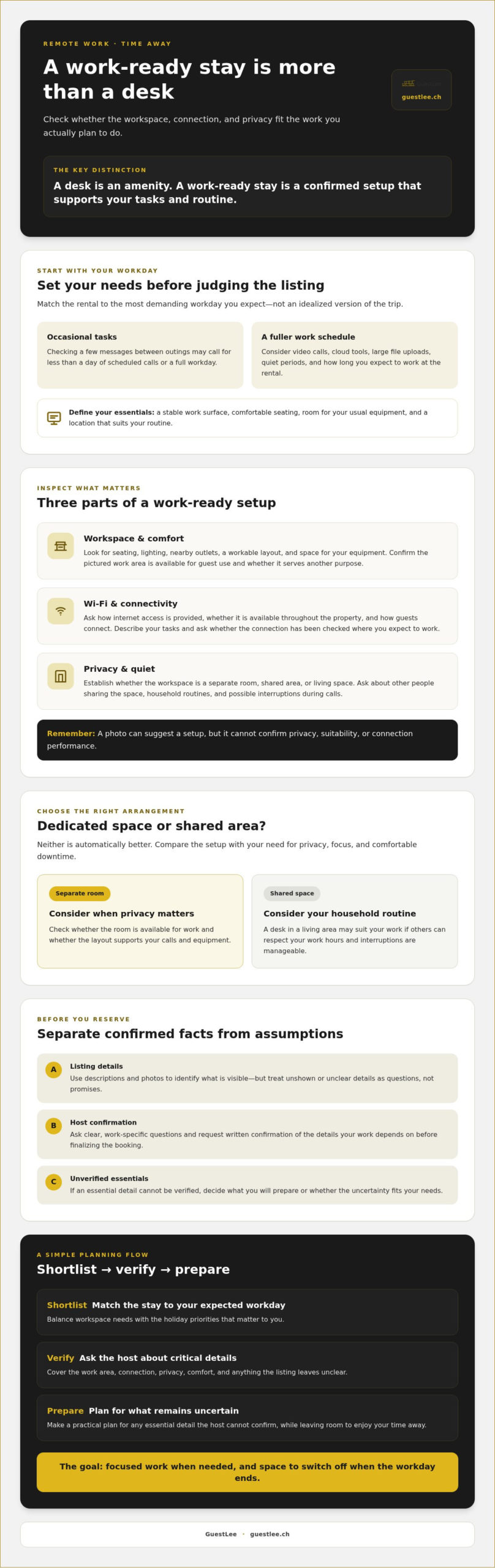
A little preparation turns confirmed details into a more composed stay. Follow a simple sequence: define your work needs, shortlist suitable rentals, verify the details that matter, then prepare your schedule and equipment. This keeps attractive photos from taking priority over the conditions your work actually requires.
- Define: Note your expected work hours, calls, equipment, and need for privacy.
- Shortlist: Compare listings against those requirements, separating essentials from preferences.
- Verify: Ask the host to confirm work-critical details in writing before finalizing your booking.
- Prepare: Plan your work routine, pack personal essentials, and decide what you’ll do if a key requirement isn’t met.
Listing checklist: define your needs, shortlist by evidence, confirm essentials in writing, and prepare a backup. This is a practical way to find a vacation rental with a home office without assuming that a pictured desk or mentioned amenity will suit your routine.
What should you confirm with the host before booking?
Keep your questions specific to the work you’ll do. Confirm that you can use the workspace throughout your stay, ask how internet access works and whether it suits tasks such as video calls, and clarify whether the area is private or shared. If the listing mentions equipment, ask what’s included and whether it will be available for your dates. Save the host’s written replies with your booking information so the agreed details are easy to reference.
How can you prepare for a smooth work-and-holiday stay?
Plan work hours around travel, rest, and anyone else sharing the accommodation. If you have a scheduled call on arrival day, allow time to settle in and check your setup first. Pack items you rely on personally, such as chargers, adapters for your devices, a headset, and any work equipment you can’t do without. Don’t assume these will be supplied by the rental.
Have an alternative in mind for an important call or an unexpected connection interruption. Depending on your needs, that could mean identifying another suitable place to work or checking in advance whether your own mobile connection is a viable backup. Choose a fallback you’ve assessed rather than relying on an unconfirmed option.
Once your work requirements are clear, explore GuestLee’s Swiss rental offering and confirm workspace and connectivity details for any property you’re considering.
Choose a Managed Swiss Vacation Rental That Fits Your Stay
Once you’ve defined your work requirements, use them as your first filter. Confirm essentials such as internet access, a suitable place to work, and the privacy your schedule calls for. Then compare comfort, layout, and setting to find a stay that also feels like a holiday. A polished listing can help you picture the experience, but property-specific workspace and connectivity details still need confirmation.
Thoughtful property management can add clarity to the guest experience. GuestLee provides property management, guest communication, and maintenance services for premium short-term rentals in Switzerland. Guest communication gives you a way to ask questions about a particular property before arrival; it doesn’t mean every rental includes an office, specific equipment, or a particular internet connection. Confirm those details with the listing or host rather than making assumptions.
What can thoughtful property management contribute?
Management and maintenance help support the care of a property, while guest communication provides a channel for clarifying practical details. If your work depends on a private room, a particular setup, or reliable internet access, ask directly whether the specific rental meets that need. A managed stay may offer a more structured point of contact, but each amenity should be confirmed for the property you’re considering.
What are the next steps when a rental looks right?
Before booking, revisit your shortlist and check each essential against the listing and the host’s written answers. Read the booking details carefully, including what’s stated about the accommodation and your stay. If something remains unclear, ask before finalizing your plans. Then arrange anything you’ll need to bring yourself, such as a headset, charger, or work device, and keep a backup plan for calls or connection interruptions.
Finding a vacation rental with a home office is about matching confirmed work conditions with the kind of break you want. Once those essentials are settled, give equal consideration to comfort and the atmosphere you hope to enjoy when the laptop is closed.
For broader accommodation context and an opportunity to explore GuestLee’s Swiss offering, visit luxury villa rentals in Switzerland. Review the details of any property that interests you, and confirm its work-related features directly before booking.
Make Your Next Stay Work Beautifully
A rewarding work-and-holiday stay begins with a clear understanding of your routine. Before you book, confirm the workspace, internet access, and privacy you need for your planned tasks. Then weigh those essentials against the comfort and setting that will make time away feel restorative. Finding a vacation rental with a home office is less about the promise of a desk and more about choosing a property whose details have been checked against your needs.
GuestLee has focused on premium short-term villa and apartment rentals in Switzerland since 2016. Its property management includes guest communication and maintenance, supporting a considered stay without implying that every property has a dedicated office or particular connectivity. Review the listing, ask about work-critical details, and make sure the confirmed arrangement suits your plans.
When you’re ready to explore, browse GuestLee’s luxury vacation rentals in Switzerland and verify the details of any property you’re considering. With thoughtful preparation, you can make room for both productive work and the pleasure of being away.
Frequently Asked Questions
How do I find a vacation rental with a home office?
Search listings for specific workspace details, review the photos, and ask the host to confirm what’s provided. Look for information about the desk or work surface, seating, privacy, and internet arrangements. The right setup depends on your plans: occasional laptop use may need less than a full schedule of calls and work sessions. Before booking, keep written confirmation of essential details rather than relying on a general “workspace” amenity label.
What should I ask about Wi-Fi before booking a vacation rental?
Describe the work you expect to do, such as video calls, cloud-based tasks, or uploading files, then ask how internet access is provided and whether it’s available throughout the property. Invite the host to share any relevant connection details they can confirm. No single speed figure guarantees a reliable experience for every task or location in the rental. If uninterrupted work matters, plan an alternative in case the connection isn’t suitable.
Can I work remotely from a vacation rental?
Remote work may be possible, but suitability depends on the specific property and your work routine. Check that you’ll have access to the workspace, internet, quiet, privacy, and any equipment you consider essential. A few emails during a trip may be manageable with a simple setup; a full work schedule calls for more careful checks. Confirm important details with the host before booking, especially if calls or deadlines can’t be moved.
Is a desk enough for a vacation rental home office?
A desk alone doesn’t establish that a rental offers a functional workspace. Consider whether the seating and lighting suit your work, whether you can reach power, and whether the area gives you enough privacy and quiet. Check that internet access suits your tasks, too. Review listing photos and ask the host about anything unclear. A basic desk may serve for a short laptop session, while full workdays deserve closer assessment.
What happens if the rental’s Wi-Fi does not support my work?
Contact the host promptly and refer to any connection details confirmed before booking. For an important call or deadline, don’t rely on an unverified connection or assume it will remain uninterrupted. Before arrival, consider a backup that fits your needs, such as checking whether your own mobile connection is suitable or identifying another place to work. Think about how much disruption you can tolerate, then use that to guide your booking decision.
Are luxury vacation rentals suitable for working remotely?
They can be, but a premium setting doesn’t automatically include a dedicated office, a quiet room, or a particular internet capability. Assess the specific listing and ask the host to confirm the workspace, connectivity, privacy, and any equipment you need. GuestLee offers premium short-term villa and apartment rentals in Switzerland, with property management that includes guest communication and maintenance. Check work-related features for the individual rental, then weigh them against the comfort you want from your stay.

Article by
Giacomo Esposito